The Problem: The 3DS Modding Scene Wasn't Built for Casual Players
I picked up Pokémon Alpha Sapphire again after years away. I wasn't interested in a fresh playthrough — I wanted to experiment: test specific teams, spawn rare Pokémon to see their stats, build competitive sets without grinding for hours. The tools exist for that. Luma3DS, the most popular 3DS custom firmware, supports plugins that run alongside the game. The 3DS modding community is active and technically impressive.
But existing Gen 6 plugins assumed you were already deep in the scene. The interfaces used hex IDs you had to look up on external wikis, the options had no explanations, and there was no in-app help if something wasn't obvious. For someone who just wanted to spawn a Garchomp without spending twenty minutes on a setup guide, it was more friction than fun.
The building blocks were already there. Gen6 CTRPluginFramework by biometrix76 — itself built on years of volunteer work going back to the Multi-Pokémon Framework — gave me a foundation. I forked it, overhauled it substantially, and added a large set of new features, all in back-and-forth collaboration with Claude. The goal throughout: every screen should make sense to someone who has never modded a game in their life.
What It Does
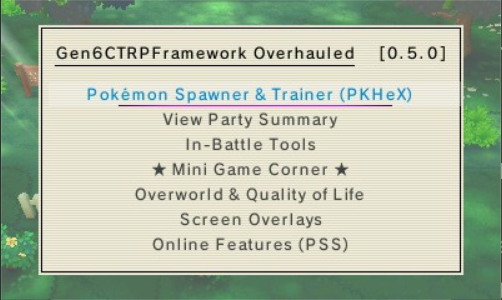
The plugin runs as an overlay on top of the game. Press the hotkey combination, the menu appears. Every section is named in plain language, every option has a description that explains what it does and what happens when you use it.
It also supports the usual quality-of-life options — fast text and walk speed, walk-through-walls, instant eggs, a configurable HUD, rebindable hotkeys, and a favorites system with drag-to-reorder. Seven languages are included: English, French, German, Italian, Japanese, Portuguese (Brazil), and Spanish.
A Fork Built on Giants' Shoulders
This project stands on a long line of volunteer work. The plugin lineage runs: Multi-Pokémon Framework → Alolan CTRPluginFramework → Gen 6 CTRPluginFramework (biometrix76) → this overhaul. Each step was someone giving their time freely so the next person could go further. None of this would exist without them.
The CTRPluginFramework (CTRPF) — the C++ library that gives plugins access to game memory, input events, and the overlay renderer — was built and maintained by ThePixellizerOSS and contributors. Address offsets and Pokédex data came from PKHeX (kwsch) and PokéAPI. Sprites from Pokémon Database. The bundled Professor Oak Challenge guide was written by Mewlax. My contribution was the overhaul and the features added from v0.3.0 to v0.5.0 — always in collaboration with Claude.
The workflow was the same as every other project: hit friction while playing, describe what I wished existed, build it in back-and-forth with Claude, test on hardware. I'm not a programmer. I'm a curious player who's good at describing problems clearly — and Claude handled the C++.
Reading Game Memory: How the Spawner Works
The Wild Pokémon Spawner works by writing directly to game memory at known addresses. When you enter a grass patch or surf on water, the game loads a "wild encounter slot" — a memory region that defines which Pokémon species will appear, its level range, and its form. The spawner overwrites those values before the encounter triggers.
CTRPF provides memory read/write functions that plugins can call. The offsets for Pokémon X, Y, OR, and AS differ per game, so the plugin detects which game is running at startup and loads the correct address map:
// Detect game and load address map
void InitGameAddresses() {
  u64 titleId = Process::GetTitleID();
  switch (titleId) {
    case 0x0004000000055D00: // Pokémon X
      g_WildSlotAddr = 0x8D6300;
      g_PartyAddr     = 0x8C8F48;
      break;
    case 0x0004000000055E00: // Pokémon Y
      g_WildSlotAddr = 0x8D6300;
      g_PartyAddr     = 0x8C8F48;
      break;
    case 0x000400000011C400: // Omega Ruby
      g_WildSlotAddr = 0x8C861C;
      g_PartyAddr     = 0x8C6D30;
      break;
    case 0x000400000011C500: // Alpha Sapphire
      g_WildSlotAddr = 0x8C861C;
      g_PartyAddr     = 0x8C6D30;
      break;
  }
}

// Write species ID to wild encounter slot
void SpawnWildPokemon(u16 speciesId, u8 level) {
  Process::Write16(g_WildSlotAddr, speciesId);
  Process::Write8(g_WildSlotAddr + 0x02, level);
}
The searchable Pokémon database — all 721 Pokémon available in Gen 6 — is stored as a compiled-in array. The search filters (by name, type, generation, whether you own it) run over this array in real time as the user types. On the 3DS's 268 MHz ARM11 processor, this is fast enough to feel instant.
The Design Principle: Plain Language, Always
Every decision in this plugin came back to one principle: a player who has never modded a game should be able to open this menu and understand what every option does without looking anything up.
That meant no hex IDs in the UI. The spawner shows "Garchomp" not "0x0192". The PC editor shows "Attack" not "Stat[0]". The teleport system shows "Petalburg City" not "warp 0x0C:0x04". Every menu item has a subtitle that appears in the status bar when it's selected, written in conversational language.
It also meant building the 23-page in-app guide. External wikis go out of date. Links break. A guide embedded in the plugin itself is always current, always available, works offline, and doesn't require the player to put the 3DS down and reach for a phone.
The Mini Game Corner: A Plugin Within the Plugin
The Mini Game Corner started as a joke and ended up being one of the most-used sections. The idea: while you're waiting for an egg to hatch or running back and forth to grind, you can play a quick mini game without leaving the plugin menu.
Seven games shipped in v0.5.0:
- Loot Boxes — randomized item rewards from tiered pools
- Spinning Wheel — land on a prize from a weighted wheel
- Slots — three-reel slot machine with configurable payouts
- Stat Duel — your Pokémon vs. a random opponent, highest stat wins
- Higher or Lower — guess whether the next Pokédex number is higher or lower
- Challenger Generator — generates a random trainer battle challenge (6v6, type-locked, etc.)
- Team Generator — builds a random team with rules you set (no legendaries, single type, etc.)
All of these run inside the CTRPF overlay renderer — no external assets, no image files, just the 3DS's built-in font and the plugin's drawing API. The rendering code uses simple primitives: filled rectangles for backgrounds, text for labels, the D-pad for navigation.
25 Color Themes with Live Preview
The theme system was technically the most interesting part of the UI code. CTRPF's overlay uses a color palette for drawing menu elements. Switching themes means updating the active palette and re-rendering the current frame — all while the menu is open.
The live preview works by applying the new palette to a single frame before committing it. The player can scroll through themes and see each one applied to the current menu state before selecting it. If they don't like it, pressing B reverts to the previous palette.
// Simplified theme switching
struct Theme {
  Color background;
  Color menuBar;
  Color highlight;
  Color text;
  Color border;
  const char* name;
};

static const Theme g_Themes[25] = {
  { Color(15, 15, 25),  Color(30, 20, 60),  Color(124, 91, 229), Color(240, 240, 255), Color(60, 40, 100),  "Purple Void"    },
  { Color(10, 25, 15),  Color(15, 45, 25),  Color(52,  199, 89), Color(220, 255, 230), Color(30, 80, 45),   "Forest"         },
  { Color(25, 10, 10),  Color(55, 15, 15),  Color(255, 59,  48), Color(255, 235, 235), Color(100, 30, 30),  "Crimson"        },
  // ... 22 more themes
};

void ApplyTheme(int index) {
  const Theme& t = g_Themes[index];
  PluginMenu::SetBackgroundColor(t.background);
  PluginMenu::SetMenuBarColor(t.menuBar);
  PluginMenu::SetHighlightColor(t.highlight);
  PluginMenu::SetTextColor(t.text);
}
Seven Languages, One Codebase
Supporting seven languages in a 3DS plugin is not something the framework makes easy. There's no built-in i18n system. Every string in the plugin is a candidate for translation, and the 3DS's small screen means every translated string also has to fit within the available width.
The solution: a centralized string table, one per language, compiled into the binary. The active language is detected from the console's system settings at startup and can be overridden from the plugin options menu.
// Language detection at startup
CFG_Language sysLang;
CFGU_GetSystemLanguage(&sysLang);

switch (sysLang) {
  case CFG_LANGUAGE_JP: g_Lang = LANG_JA; break;
  case CFG_LANGUAGE_FR: g_Lang = LANG_FR; break;
  case CFG_LANGUAGE_DE: g_Lang = LANG_DE; break;
  case CFG_LANGUAGE_IT: g_Lang = LANG_IT; break;
  case CFG_LANGUAGE_ES: g_Lang = LANG_ES; break;
  case CFG_LANGUAGE_PT: g_Lang = LANG_PT_BR; break;
  default:              g_Lang = LANG_EN; break;
}A Curious Player with a Very Patient AI
I'll be upfront about this: I'm not a programmer. I'm a curious player — someone who's good at testing, poking at things, and thinking hard about a problem and how it might be solved. Every feature in this plugin came from the same place: being deep in a run, hitting some friction, and thinking "there should be a way to…"
The collaboration model with Claude is the same one I use for every project: describe the feature, review the code that comes back, test on hardware, adjust. The difference here vs. a JavaScript plugin or a C# utility is that I was working inside a pre-existing C++ codebase, in an ecosystem where the forum posts are ten years old and documentation is sparse. Claude handled the C++; I handled knowing what the game actually needs.
The 23-page guide was the last thing built — and the most purely human part of the project. No Claude needed for that. It's just a player explaining what they built to another player, organized the way you'd actually think about it mid-game.
The Result
Gen6 CTRP Framework Overhauled is a free, open source Luma3DS plugin that works on any modded Nintendo 3DS running Pokémon X, Y, Omega Ruby, or Alpha Sapphire. It requires no coding knowledge to install or use. Drop the .3gx file on your SD card in the right folder, boot the game, press the hotkey, and the menu is there.
It has everything I wished existed when I picked up the 3DS again: a spawner that speaks Pokémon names instead of IDs, a PC editor that works like a real tool, battle helpers that explain what the AI is doing, and enough small things (fast text, fast walk, instant eggs) that replaying the game doesn't feel like a chore.
Download, source, and the full feature list: github.com/samaBR85/Gen6CTRPFrameworkOverhauled — GPL-3.0, free.
Credits
This overhaul stands on a long line of freely given volunteer work. In rough lineage order:
- biometrix76 — Gen 6 CTRPluginFramework, the direct parent of this fork
- AnalogMan151 — Alolan CTRPluginFramework, the generation before that
- ThePixellizerOSS et al. — 3gxtool and CTRPluginFramework itself
- Alexander Hartmann — the XY & ORAS foundation
- PKHeX (kwsch) et al. — database, documentation, examples, and code
- dragonfyre173 — the in-game data viewer overlay
- JourneyOver et al. — the extensive ActionReplay code database
- Mewlax (u/mewlax84) — author of the ORAS and X/Y Professor Oak Challenge guides bundled in-app
- Pokémon Database, PokéAPI, Bulbapedia, ORAS Wiki — sprites, icons, and location data
All Pokémon images and names are © Nintendo / Game Freak / The Pokémon Company. This is a free, non-commercial fan tool.