The Problem: I Wanted to Play With OoT3D, Not Fight the Tools
I went back to The Legend of Zelda: Ocarina of Time 3D not for a clean run but to mess around — teleport across Hyrule, test items, chase a 100% file without redoing everything by hand. The 3DS can do all of that: Luma3DS loads plugins that run alongside the game and can read and write its memory live. The scene that makes this possible is impressive and generous.
But the tooling assumes you already speak its language. Cheats are hex codes you paste from a forum. Warps are entrance indices. There's no in-game explanation of what anything does, and nothing tells you whether a code even matches your version of the game. For someone who just wants to jump to the Water Temple and keep playing, that's a lot of friction for a little fun.
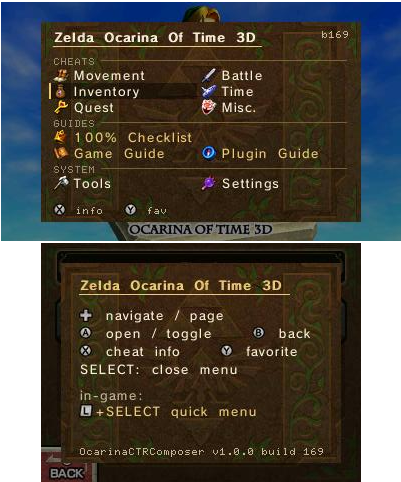
So I built OcarinaCTRComposer: a plugin that opens with SELECT and shows a themed menu where every cheat has a name, teleport destinations are places (not numbers), and a 100% checklist reads your save file to fill itself in. It's built on top of a small engine I made called CTRComposer, and — like everything else on this site — it was written in back-and-forth collaboration with Claude.
What It Does
Press SELECT and the plugin draws its own menu over the game — no game assets, just the console's shared font and shapes drawn by the plugin itself. Every section is named in plain language.
SELECT always returns you to the game, and reopening resumes exactly where you left off — even mid-tool. The UI ships in English with a built-in system that loads more languages from plain SD text files, and the embedded guide is available in six.
Built on CTRComposer, a Game-Agnostic Engine
This plugin is really two projects. Almost everything you see — the menu, the themes, the on-screen keypad, the memory tools, the guide reader, the way it draws its own window over the game — belongs to a separate, game-independent engine called CTRComposer. OcarinaCTRComposer is what you get when you point that engine at one specific game.
The split matters because it means about 90% of the work isn't Zelda-specific at all. A new plugin for a different 3DS game is essentially a cheat table, some art, and a Title ID — everything else is reused as-is. I wrote up the engine itself, and every technique behind it, in its own article.
→ Read the CTRComposer deep-dive — the framebuffer rendering, the system font, pausing the game, and the memory tools, all documented.
The 100% Checklist That Reads Your Save
The feature I'm most attached to is the completion tracker. A normal checklist makes you tick 200 boxes by hand. This one reads your actual save data and fills itself in — and, crucially, it stays in sync: if you load a different file, it adds what that file has and removes auto-marks it no longer sees, while leaving anything you ticked by hand alone.
Getting there meant mapping the game's save format — which bit means "learned Zelda's Lullaby," which byte tracks heart pieces. Cheat Search is great at finding a number by its magnitude, but useless for packed bitfields where a dozen unrelated facts share one byte. The trick that cracked it was save-diffing: OoT3D has community "start-to-finish" save collections — a series of saves, each one documented step further into the game.
Anchor one save file to RAM by finding a field whose bytes you already know (an inventory array that matches a known cheat buffer), which pins the whole file-to-memory mapping. Then diff consecutive saves: the bits that flip on are exactly what that save gained — a song, a stone, a flag — and lining those diffs up against the collection's written notes gives each bit a name. A throwaway Python script does it in one pass, and the map is self-validating against bits already confirmed on hardware.
Teleport by Driving the Game's Own Load Routine
Warping looks like it should require calling one of the game's functions, but it's really just memory writes the game reads back on its own. The plugin shares the game's address space, so setting a value is a pointer write — no hooks, no injected code paths.
Teleport works by populating the fields the load routine consumes — the destination entrance, the transition type — and then flipping the "load now" flag the game already checks each frame. Next frame, the game performs the warp itself. The same idea powers the self-naming waypoints: save the current entrance and position, and restoring is just writing them back and raising the flag.
// The plugin runs inside the game's process, so a cheat is a memory write.
// Data cheat — direct:
*(volatile u16*)<addr> = <value>;

// Base + offset (a value hanging off the player pointer):
u32 base = *(volatile u32*)<playerPtr>;
if (base) *(volatile u32*)(base + <offset>) = <value>;

// Teleport = drive the game's own load: set destination, then raise its flag.
*(volatile u16*)<entranceField> = destination;
*(volatile u8*)<loadFlag> = 1; // the game loads it next frame0004000000033500). On EUR/JPN they differ — enabling a mismatched cheat may do nothing or crash. The plugin ships anchored to the USA copy for that reason.
A Curious Player, Again
The working style is the same as every project on this site: I'm not a programmer. I'm a player who is good at describing what's missing and testing whether a fix actually does what it should on real hardware. Every feature came from being deep in a playthrough and thinking "there should be a way to…" — and then building it in back-and-forth with Claude.
What made this one interesting is that it sits on top of an engine I'd already built with the same method, so the game-specific work — the cheat table, the save format, the teleport destinations — was the whole job. The engine handled the hard parts (drawing over the game, the font, pausing, persistence); I handled knowing what an Ocarina of Time player actually wants at hand.
The Result
OcarinaCTRComposer is a free, open-source (MIT) Luma3DS plugin for Ocarina of Time 3D. Drop the .3gx into your game's Title ID folder, enable the plugin loader, press SELECT, and the menu is there — cheats by name, teleport by place, a checklist that reads your save, and memory tools when you want to go deeper. It also installs from the samaBR85 UniStore, straight to the SD card with no PC needed.
Download, source and the full feature list: github.com/samaBR85/OcarinaCTRComposer — MIT, free, non-commercial fan project.
Credits
This plugin stands on a lot of freely shared work:
- Nanquitas — the original OoT3D cheats plugin & cheat codes
- Luma3DS (LumaTeam) — the plugin loader
- PabloMK7 — the 3GX plugin loader and 3gxtool
- z64central.com — the walkthrough text; packaged for the plugin by LowEndC
- gamestabled and HylianFreddy — the OoT3D Practice Menu, reference for the entrance-warp mechanism behind Teleport
- HelpTheWretched (HTW) — the progressive "start-to-finish" saves used to map the 100% Checklist
- The Spriters Resource / Colbydude — item sprites; additional codes by Fort42
Rendering techniques referenced from CTRPluginFramework. All game content is © Nintendo — this is a non-commercial fan tool that contains no game assets; it reads and modifies the running game's memory on the user's own console.