The Problem: Every Teleprompter Makes You Stop Editing to Go On Air
A teleprompter is a simple-sounding thing — scroll text past a presenter at a readable pace. But the moment a live show starts, the ordinary ones fall apart in the same way: the script is frozen. A guest says something that changes the next line, a segment gets cut, a name is wrong — and you can't fix it, because editing the text would move the presenter's place in it.
The reason is technical. Ordinary teleprompters store the scroll position in pixels. Change the text, the typeface or the margin and the whole layout reflows — pixel 4,200 is suddenly a different sentence, and the words jump in the presenter's face mid-read. That's why those apps make you leave the presentation screen to edit at all.
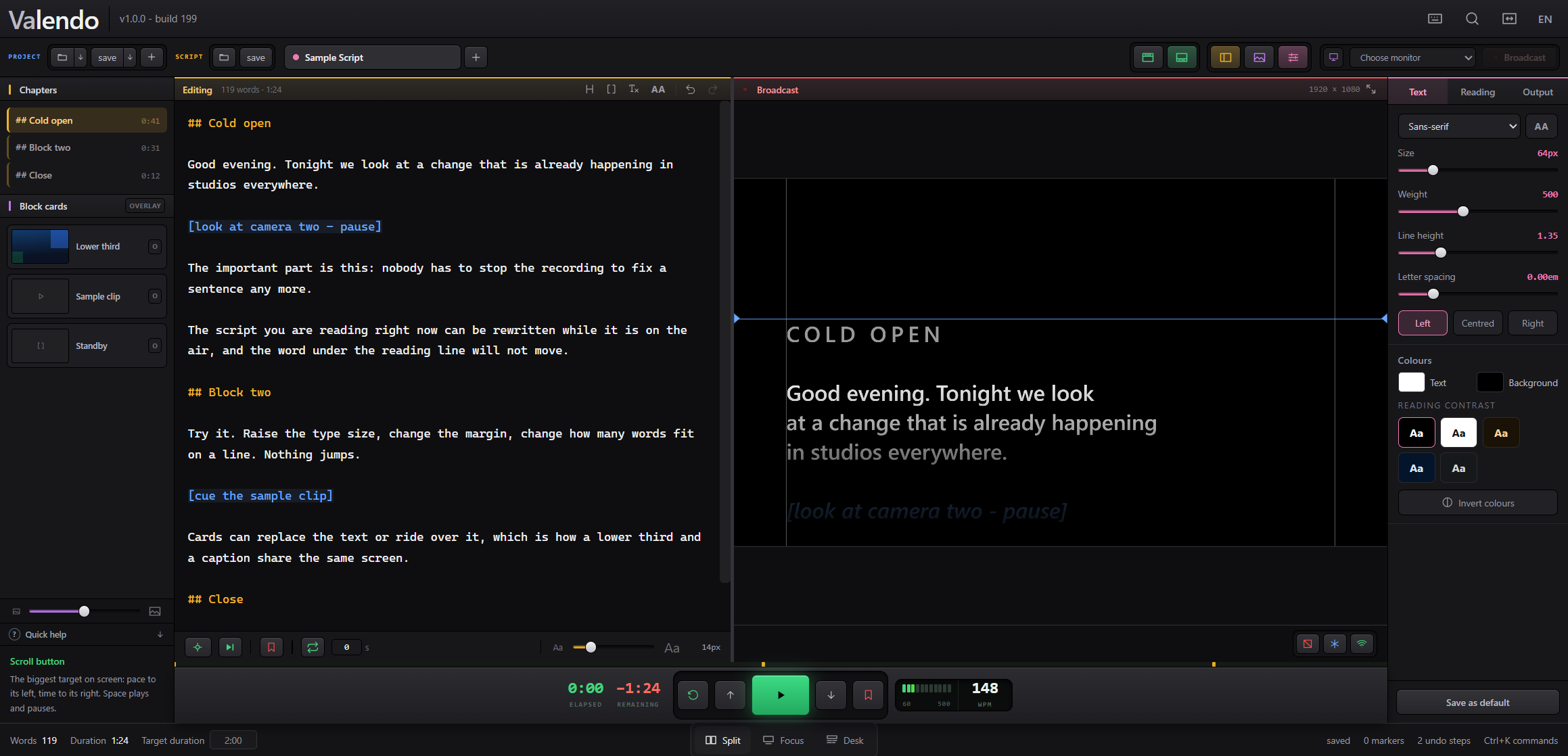
Valendo is my answer to that. It's a teleprompter for Windows and macOS where the operator rewrites the script while the show is on the air, watching the editor and an exact replica of the presenter's screen side by side. Like everything on this site, it was built in back-and-forth with Claude — and it all hangs off one idea.
The One Idea: A Semantic Reading Anchor
Instead of remembering "we're 4,200 pixels down," Valendo remembers which word is being read: a semantic anchor of { blockId, wordOffset }. The pixel position is recomputed from that anchor after every layout change, not stored.
That one decision is what makes live editing possible. Insert three paragraphs above the reading point, bump the font size, widen the margin, switch the typeface — the pixel math changes completely, but the anchor still points at the same word, so the presenter's line never moves. Editing above the read head is free; the read head is glued to meaning, not to a coordinate.
// Not this — a pixel position that any reflow invalidates:
scrollTop = 4200;

// This — an anchor in the text; the pixel is derived, never stored:
anchor = { blockId: "b12", wordOffset: 37 };
scrollTop = measurePixelForWord(anchor);  // recomputed after every reflow
A few things follow from it that are easy to miss. The two screens are drawn by one component, so the operator's replica is the presenter's screen, not a lookalike — they can't drift. Scrolling is driven by a clock, not by a stream of position messages, so there's nothing to buffer or fall behind. And lines are composed by words, on Valendo's own rules, rather than left to the browser — because the anchor needs to know where every word sits.
What It Does
The left panel is the script; the right panel is what the presenter sees, at the output's real resolution. ## opens a chapter, [square brackets] mark a stage direction. From there it grows into a small live-production desk.
It also imports and exports txt, md, docx and pdf, keeps its own .valendo projects with autosave, has infinite undo that persists across sessions, a command palette with remappable keys, and ships in six languages.
Cards: How a Lower Third and a Caption Share One Screen
A card is anything you push to the presenter's screen on top of — or instead of — the script: an image, a video, a message. The distinction that makes them useful is that each card either replaces the script or rides over it. That's how a lower third (over) and a full graphic (replace) live in the same deck, triggered by a click or a number key. Legibility over a card is a three-way choice per card: a dark band behind the text, a per-letter shadow, or nothing.
Video is where a broadcast tool usually forces a slow import step. Valendo plays the file as it arrived whenever the browser can handle it — no wait. When it can't, ffmpeg first tries to change only the container (a remux — seconds, no pixel re-encoded) and only falls back to a real re-encode when the content genuinely won't fit an mp4. Most files are on screen in seconds instead of minutes.
It Doesn't Open Your Work For You
One small decision I'm oddly proud of: Valendo never restores the last script by itself. It starts on a blank welcome screen, and reopening your show is a deliberate Pick up where I left off click.
The reason is the room it runs in. Open a teleprompter in someone else's studio, or on a machine already mirrored to a wall, and auto-restoring the previous project would put the last client's script on a screen in front of people who were never meant to see it. A script is a client's material. Starting blank is a privacy default, not laziness — the app waits to be asked.
The Stack, and Why Electron Earned Its Place
Valendo is an Electron app with a React/TypeScript front end, and for once the "it's a browser in a box" tradeoff is exactly right. The presenter's screen is a second window drawn by the same React component as the operator's replica, so keeping them identical is free — they're literally the same code. Text layout, reflow measurement and the word-by-word line composition all lean on the browser's mature text engine, which is precisely the hard part I didn't want to reinvent.
Native gets pulled in exactly where the web platform stops: multi-monitor placement and hot-plug survival through Electron's screen APIs, the local follow-along page served off the machine, and ffmpeg shelled out for the remux-first video path. It's a clean seam — browser for everything about text and layout, native for everything about the room and the hardware.
Built with Claude
Same as every project on this site: I'm not a programmer. I know what a live show needs at the operator's hands because I've been on that side of it — the panic of a script that can't change while you're reading it. What I did was describe those needs precisely, and build Valendo with Claude, testing each piece against the way a real show actually breaks.
The anchor was the conversation that mattered. Once the reading position was a word instead of a pixel, feature after feature that seemed hard became easy — live editing, font changes on air, the phone follow-along — because none of them could move the presenter's place anymore. Getting that one abstraction right is most of what this project is.
The Result
Valendo is available now for Windows and macOS, with a 15-day free trial — no account, no card, everything unlocked from the first launch. After the trial, it never locks a project away: it keeps working with fewer features, or you move to one of two paid tiers — Standard for one operator on one machine, Studio for a full production with the network page and the command desk. The full feature list, and pricing, is on the site.
Download and pricing: valendo.app. Fifteen days free, no card required, and the app is never unusable even if you decide not to subscribe.